


Weedmaps: Buy Local Weed
4.737.15K Reviews
App Specs
- Version
- 9.80.0
- Updated On
- License
- Free
- Downloads
- 5,000,000+
- Developer
- Weedmaps
- Categories
- Lifestyle
- Platform
- Android
Screenshots
 Analysis by AppCompare
I approach cannabis shopping apps with a little more caution than an ordinary restaurant or retail app. The product itself is regulated differently from place to place, deliveries involve personal information, and a convenient interface can sometimes encourage rushed decisions. After spending time with Weedmaps, I found that its main value is not simply putting dispensaries on a map. It brings local stores, menus, brand browsing, deals, and delivery options into one place, while leaving the important responsibility of checking local rules and making a careful purchase with me.
That balance matters. Weedmaps is a free lifestyle app from Weedmaps, aimed at adults and marked Mature 17+. It has been around since Apr 18, 2010, and its scale is easy to notice: the app has passed five million installs, with a 4.7 average from roughly ninety-seven thousand ratings and about thirty-seven thousand written reviews. Those figures suggest a well-established service, but they do not remove the need to inspect each listing, seller, and checkout detail for myself.
My overall impression is positive for people who want a practical way to explore nearby cannabis retailers. I would not treat it as a substitute for reading product information, understanding local purchasing rules, or deciding whether sharing location and order details is worthwhile. Its strongest feature is choice; its biggest challenge is that more choice also means more checking.
What the app is really useful for
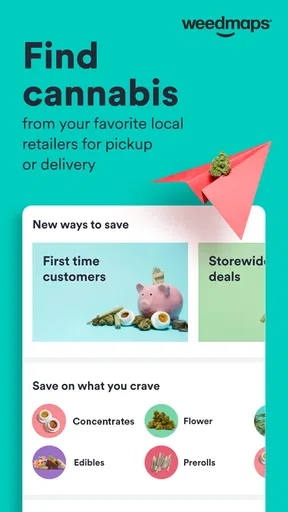
The first screen makes the purpose clear: Weedmaps connects shoppers with dispensaries, cannabis brands, local deals, and delivery services. Rather than opening several store websites individually, I can use one app to compare what is available around me. That is especially helpful when I am trying to find a particular product type, looking for a store open at a convenient time, or deciding whether delivery is more practical than a visit.
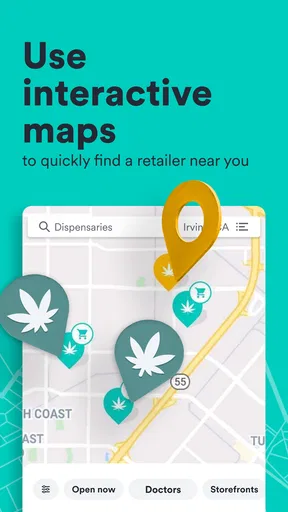
I found the local-discovery angle more useful than the promotional language might suggest. A map can help me understand whether a retailer is genuinely convenient or merely appears near the edge of a broad search area. A menu can also save a wasted trip, although I still regard it as a snapshot rather than a guarantee. Cannabis inventory changes, and an item shown in a menu may not remain available by the time I arrive or complete an order.
The app also works well when I am unfamiliar with an area. Instead of relying only on a general web search, I can look at nearby dispensaries in a cannabis-focused setting and compare their available categories. That makes it easier to narrow the search before deciding which store deserves a closer look.
For a realistic everyday example, imagine finishing work in an unfamiliar neighborhood and wanting to shop before heading home. I can use the location view to identify nearby retailers, inspect menus, compare current offers, and choose between pickup and delivery where those options appear. The useful habit is to check the final product, quantity, taxes, fees, and fulfillment method before committing, rather than assuming the first attractive deal is the best total value.
Worth Reading Before You Choose

EA SPORTS FC Mobile 26 Is a Bigger Football Game, but It Takes Time

Flipboard Shows What News Apps Must Do Beyond the Feed

Switching to Android Auto Means Rethinking Your Driving Routine

Google Calendar Makes a Crowded Week Easier to Manage

Ludo King Makes the Most of the Minutes Between Plans

Baby Panda World Brings Quick Play to Modern Phones, but Its Game Library Feels Busy
Browsing is better than blindly chasing deals
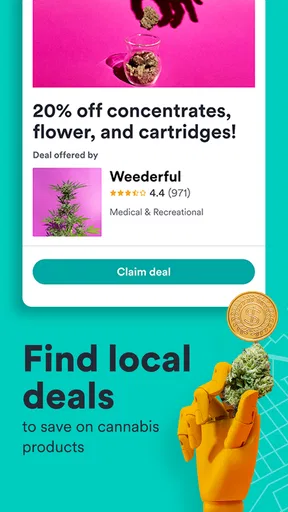
Deals are one of the app’s obvious attractions, but I think they require the most discipline. A discount can look impressive while applying only to selected products, a first purchase, a particular day, or a specific fulfillment method. The app helps me discover promotions, but I still need to read the conditions and compare the final amount with nearby alternatives.
My preferred workflow is to begin with the product or category I actually want, then use deals as a filter rather than as the starting point. This prevents the common mistake of buying something merely because it is promoted. It also makes comparison more meaningful: I can ask whether the discounted item suits my needs and whether the store’s total cost remains competitive after any service or delivery charges.
That approach is one of the less obvious strengths of Weedmaps. It can reduce search time without forcing me to make the promotion the center of the decision. Used that way, the app feels more like a local research tool than a digital coupon folder.
Menus, brands, and the limits of digital comparison
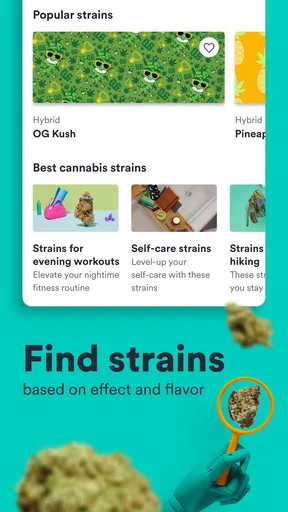
Brand browsing is useful when I already have a preference or want to learn which retailers carry a particular line. It gives me another route into the catalog: I can start with a store, a category, or a brand instead of repeating the same search across separate websites. For someone who is still learning the differences between products, that broader view can make the market feel less confusing.
At the same time, a product card cannot answer every question I might have. I still want to examine the available description, packaging information, and any details shown before ordering. I would not use a thumbnail, a discount label, or a familiar brand name as a replacement for checking the actual item supplied by the retailer.
This is where Weedmaps differs from a simple map application. A map app may help me find a business, but it usually does not provide the same cannabis-specific browsing context. A store’s own website may offer more direct information about that retailer, while Weedmaps is better for discovering and comparing multiple local options. My choice depends on the task: discovery favors Weedmaps; final verification may be better on the retailer’s own channel or at the store.
Trust, controls, and moments that deserve care
I pay closest attention when browsing turns into a decision: choosing a retailer, sharing location, or moving toward an order. I find it helpful to decide in advance what information I’m comfortable sharing and what I need to verify before continuing. That kind of deliberate routine makes the app easier to use thoughtfully, especially when convenience might otherwise crowd out a careful check.
What I can verify before I use it
Trust begins with knowing what I am doing inside the app. Weedmaps is clearly presented as a lifestyle service for mature users, not as a general shopping utility. Its current version is 9.80.0, and it supports devices running Android 7.0 or later. Those details are useful when deciding whether an older phone can run it, but compatibility should not be confused with suitability. A supported device does not automatically make every purchase or account choice appropriate for every person.
I pay attention to the screens that ask me to choose a location, sign in, or continue toward an order. These are the moments when I want clear user choices rather than accidental commitment. I prefer to enter only what is needed for the task at hand, review the selected retailer, and pause before moving from browsing into a transaction.
The app’s free price lowers the barrier to trying it, but “free” does not mean there are no practical costs. The order itself may involve the retailer’s product prices and fulfillment charges, and a delivery option can change the final total. I therefore treat the app as free to install and explore, while checking the complete purchase summary before placing anything.
Another important control is simply the ability to stop. I can browse without treating every search as an order, compare stores before selecting one, and leave the process if the details are unclear. That may sound basic, but it is valuable in a category where availability, eligibility, and local requirements can affect the transaction.
Location and personal information require deliberate choices
Location is central to the app’s usefulness because nearby dispensaries and delivery coverage depend on where I am shopping. That also makes location one of the most sensitive moments in the experience. I recommend considering whether precise access is necessary for the current task, and reviewing the phone’s permission controls rather than granting access automatically.
If I am only researching a neighborhood or comparing general options, I may prefer to enter a location manually when that is available to me instead of sharing more location context than I need. If I want the most convenient nearby results, location access may make the experience faster. The trade-off is straightforward: better local relevance in exchange for more location exposure.
Account details deserve the same attention. I would use a strong, unique password where a password is involved, avoid saving sensitive information on a shared device, and sign out when using someone else’s phone. I also keep order details in mind, since a delivery or pickup request can reveal more about my shopping activity than a simple map search.
I do not assume that an app’s popularity answers privacy questions for me. A large user base can indicate familiarity, but it is not a reason to skip permission screens or account settings. My practical test is whether I understand what I am allowing, whether I can change that choice later, and whether the convenience is worth it for this particular use.
Delivery is convenient, but it adds another layer
Delivery is probably the feature that most changes the app from a discovery tool into a transaction tool. It can be a genuine help when transportation is difficult or when visiting a store is inconvenient. It also creates more points where accuracy matters: the selected address, delivery area, product availability, timing, fees, and any identity or eligibility checks required by the retailer.
Before ordering, I would verify the address character by character, especially if I am sending something to a workplace, hotel, or apartment complex. I would also avoid assuming that the delivery estimate is a promise. A product can sell out, a retailer can adjust availability, or a driver may need additional instructions. The app is useful for organizing the process, but the retailer remains important to the practical outcome.
For privacy-conscious users, pickup may be the better compromise. It still involves an order and account activity, but it avoids sharing a delivery destination and can make the handoff more predictable. For others, delivery may be worth the additional information because it solves a real transportation problem. Neither option is universally better; the right choice depends on what I value more in that moment.
Who should use it, and who should skip it?
I think Weedmaps is a strong fit for adults who want to compare local dispensaries instead of searching store by store. It is also useful for people who move between neighborhoods, travelers who need to understand nearby retail options, and shoppers who value seeing menus and promotions before making a trip. The brand view can help repeat buyers locate familiar products across different retailers.
I would be more cautious about recommending it to someone who wants a completely private, account-free experience, dislikes location-based services, or expects every menu to function like a guaranteed live inventory system. Someone who already has a trusted retailer and only needs that store’s exact ordering process may find the retailer’s own app or website more direct.
It is also not the right tool for rushing into a purchase. New or uncertain shoppers may benefit from slowing down, reading product details, asking a qualified retailer questions, and learning the rules that apply where they live. Weedmaps can organize choices, but it cannot make a personal health or legal decision on the user’s behalf.
Small habits that make the experience safer and clearer
Start with a specific goal, such as finding a nearby retailer, checking a familiar brand, or comparing delivery with pickup. A focused search produces more useful results than browsing every promotion.
Check the retailer and fulfillment method before judging a deal. The same product category can look different depending on whether I am collecting it in person or requesting delivery.
Review the final order screen carefully. I look for the exact item, quantity, destination or pickup location, and total cost before confirming.
Revisit location and account permissions after setup. Convenience is not a one-time decision; I can adjust access when I no longer need the app to provide highly local results.
Keep a backup plan. If an item disappears or a store’s menu changes, I use the app’s broader local view to compare another retailer rather than forcing an unsuitable substitute.
These habits reveal an important trade-off. Weedmaps can make the market easier to navigate, but it can also make shopping feel frictionless enough that I might overlook the details that deserve attention. The best experience comes from using its speed for discovery and my own judgment for verification.
My cautious verdict
After using it as a local cannabis-shopping companion, I see Weedmaps as most valuable when I need breadth: several dispensaries, multiple menus, brand discovery, deals, and the possibility of delivery in one place. Its long presence in the category and strong user response make it an easy app to consider, and the free entry point means I can explore without paying for the app itself.
My recommendation comes with clear boundaries. I would not rely on a listing without checking the retailer’s final information, and I would not grant location or account access without considering the privacy trade-off. I would also compare the completed cost rather than judging a purchase by its headline promotion.
For me, the app earns its place on a phone when I am comparing local options or trying to plan a convenient purchase. It is less compelling when I already know exactly which retailer I trust and want the shortest possible path to that store’s checkout. In the right situation, it saves time and improves visibility; in the wrong one, it can add unnecessary account and location exposure.
That is why my final view is favorable but measured. Weedmaps is a capable, mature lifestyle app for researching and arranging cannabis purchases, not a reason to stop thinking carefully. If you value local comparison and are willing to review permissions, product details, and order information yourself, it is a practical choice. If privacy, direct retailer communication, or a minimal shopping trail matters more than broad discovery, a store’s own channel may suit you better.
Pros
- Large directory of licensed dispensaries and delivery services
- Menus show product details
- prices
- brands
- and availability
- Useful filters help narrow results by product type and location
- Reviews and ratings can help compare local cannabis businesses
- Pickup and delivery options make ordering more convenient
Cons
- Availability and features vary significantly by location
- Prices may not include taxes
- delivery fees
- or minimum orders
- Some menus can become outdated before inventory is refreshed
- Age and identity verification may be required to place orders
- Not available in regions where cannabis sales are not legally permitted
FAQs for Weedmaps: Buy Local Weed
What is Weedmaps: Buy Local Weed used for?
Weedmaps is a marketplace and discovery app that helps users find licensed cannabis dispensaries, delivery services, products, doctors, and related businesses in supported locations. You can browse menus, compare prices, read customer reviews, check store details, and sometimes place an order directly through the app. Availability depends on local laws, licensing, and the services offered by each listed business.
Is Weedmaps legal and available everywhere?
No. Weedmaps availability depends on cannabis regulations in your country, state, province, or city. The app may display businesses only in areas where cannabis services are legally permitted, but its presence does not mean every product or delivery option is legal in your location. Before ordering, check local rules, age requirements, possession limits, delivery restrictions, and whether the selected retailer is properly licensed.
Can I buy cannabis directly through the Weedmaps app?
In many supported areas, Weedmaps allows users to browse dispensary menus and submit pickup or delivery orders, although the exact process varies by retailer. Some businesses use Weedmaps only for listings and require payment or order confirmation separately. You will generally need to meet the legal minimum age, provide valid identification, and follow local purchasing rules before an order can be completed.
Does Weedmaps verify dispensaries, products, and customer reviews?
Weedmaps provides business listings, menus, ratings, reviews, and product information, but users should still evaluate each listing carefully. Verification standards and available information can differ by location and retailer. Check licensing details, recent reviews, operating hours, taxes, delivery fees, and return or cancellation policies. Product effects and quality may also vary, so do not rely exclusively on ratings or promotional descriptions.
What should I know about privacy, payments, and delivery before using Weedmaps?
Using Weedmaps may involve sharing location information, contact details, identification during a purchase, and order data with the selected retailer or delivery provider. Payment methods differ between businesses, and some may accept only certain options or collect payment upon delivery. Delivery zones, minimum orders, fees, estimated times, and identification checks also vary, so review the retailer’s terms carefully before confirming.


